Best Bluetooth Thermal Printer Brands (2026)
Rongta, Xprinter, MUNBYN, and NETUM are the most widely available Bluetooth thermal receipt printer brands worldwide. Here's what actually differs between them, real price ranges, and how to connect any of them to your phone.
| Brand | Best For | Price Range (USD) | Paper Sizes | Where to Buy |
|---|---|---|---|---|
 Rongta Rongta | Safest default, widest availability | $30 – $70 | 58mm, 80mm | Amazon |
 Xprinter Xprinter | Lowest-cost entry, light use | $25 – $45 | 58mm, 80mm | Amazon |
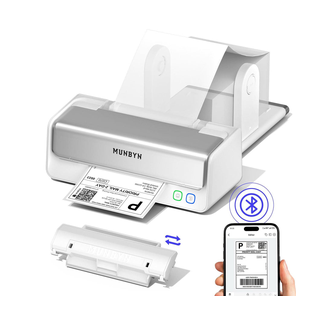 MUNBYN MUNBYN | Field use, delivery, better build | $46 – $79 | 58mm, 80mm | Amazon, munbyn.com |
 NETUM / Star Micronics NETUM / Star Micronics | Higher-volume commercial counters | $80 – $140 | 80mm | Amazon, authorized dealers |
 Epson TM-series / Zebra Epson TM-series / Zebra | Enterprise-grade durability | $150+ | 80mm | Authorized dealers |
Prices are approximate street ranges as of 2026 and vary by seller and region — check the current listing before buying.
If you're buying your first Bluetooth thermal printer for a shop, restaurant, or delivery business, the brand matters less than most sellers make it sound. Nearly every printer in this category speaks the same ESC/POS command language — a $25 no-name printer and a $120 branded one will both print a receipt correctly once paired to the right app. What actually differs between brands is build quality, battery life, paper-loading design, and how easy it is to find support or spare parts later.
Rongta — The Safest Default Choice
Rongta is one of the most common brands on Amazon for a reason — models like the RPP02N and RP58 series are widely stocked, well documented, and show up repeatedly in compatibility lists across billing apps, not just one ecosystem. If you want a printer that's guaranteed to "just work" without research, a Rongta 58mm model in the $30–45 range is the safest starting point.
Xprinter — Strong Value at the Budget End
Xprinter's XP-58IIIBT and similar models are consistently the cheapest entry point into a genuinely reliable ESC/POS printer, typically $25–35. They're a good fit if you're printing low volumes and don't need an auto-cutter.
MUNBYN — Better Build Quality, Slightly Higher Price
MUNBYN printers (RW411B and the 80mm P047 series) tend to have sturdier housings and more reliable Bluetooth pairing at the mid-tier price point ($46–79), with both 58mm and 80mm options. If a printer is going to travel — a delivery vehicle, a market stall, a field sales visit — MUNBYN's build quality is usually worth the premium over Xprinter.
NETUM and Star Micronics — For Higher-Volume Counters
NETUM and Star Micronics both show up frequently in commercial-grade recommendations, generally in the $80–140 range with auto-cutter and dual-mode Bluetooth + USB connectivity — worth the extra cost once you're printing enough volume that reliability and speed matter more than upfront price.
Other Brands Worth Knowing
Epson TM-series, Bixolon, iDPRT, GOOJPRT, Sewoo, Zjiang, HOIN, Sunmi, and Zebra all show up in retail and restaurant setups too — mostly at the higher end for established businesses with a preferred hardware vendor. None of these require a special app; ESC/POS is ESC/POS regardless of brand.
58mm or 80mm — Which Should You Buy?
58mm printers are cheaper, more portable, and fine for short receipts, QR codes, and delivery slips. 80mm printers cost more but fit a full itemized invoice or a detailed restaurant bill without cramming text. If you're billing a restaurant table or a retail counter with itemized invoices, buy 80mm. If you're a delivery driver, field vendor, or running simple one-line-item sales, 58mm is enough and easier to carry.
What to Check Before You Buy
ESC/POS support should be explicitly stated in the listing, not assumed, even though nearly all Bluetooth thermal printers support it. Bluetooth 4.2 or newer pairs faster and holds a more stable connection with modern phones. For a printer that leaves the counter — delivery, field sales — look for higher-capacity batteries and USB-C charging. An auto-cutter is a real convenience at a busy counter, but it adds cost and is one more part that can eventually wear out.
Connecting Any of These to Your Phone
Whichever brand you buy, the setup is the same: pair the printer under your phone's Bluetooth settings, then open Simple Bluetooth Printer and select it from the app. Because the app talks ESC/POS directly rather than depending on a manufacturer's own software, you're not locked into one brand if you switch printers later — the same app keeps working, on both Android and iPhone.
Simple Bluetooth Printer
Works with every brand on this page, on Android and iPhone — no driver, no setup screens.
Frequently Asked Questions
Which thermal printer brand is best for a small business?
Rongta is the safest default — widely available, well documented, and reliably compatible with ESC/POS billing apps. Xprinter is a solid budget alternative if you're printing low volumes.
Do I need a specific app for a specific printer brand?
No. Any ESC/POS Bluetooth thermal printer — regardless of brand — works with Simple Bluetooth Printer. The app isn't tied to Rongta, MUNBYN, or any single manufacturer.
Is a more expensive thermal printer actually better?
Mostly for durability and battery life, not print quality — a $25 printer and a $120 printer will both produce a correct ESC/POS receipt. The price difference shows up in how long the printer survives daily use, not in what it prints.
Does the same app work on both Android and iPhone?
Yes. Simple Bluetooth Printer is available on both the Google Play Store and Apple App Store, so a mixed device fleet — some staff on Android, some on iPhone — can use the same printer hardware with the same app.